Review by Joe Mehaffey and Jack Yeazel
Revision: 5 March 2004 (Draft 5)
Return to GPS General Information Home Page
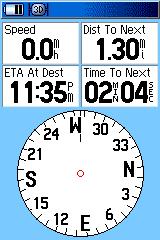
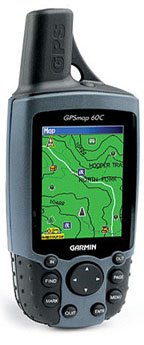
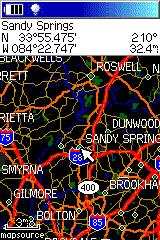
GPSmap60 C
G-60C has good complement Car Navigator features
without giving up Hiking capability.
GPSmap60 C
G-60C has good complement Car Navigator features
without giving up Hiking capability.
OVERVIEW:
The GPS-60C appears to us to be the
new "GPS for all". Just as the GPS-12xl in its time was a universal
favorite that fitted many needs, we think the G-60C will be the universal
favorite now. In the past, Garmin has "segmented" the GPS market
into Outdoor, Marine, Car Navigator, and Aviation. The G-60C does
a good job at Car Navigation and Outdoor applications and a passable job
with marine guidance. We think this combination will fit a lot of
people's needs. This system has more different user screen
options than any unit that we have reviewed. See
sample screens HERE.
The G-60C has a sunlight-readable display with 256-color transreflective TFT display. It is also the first color screen handheld we have seen that offers a long battery life. Garmin's claims 30 hours on just two AA alkaline cells seems to be about right for intermittent use without a backlight. When we first looked at the screen of the G-60C indoors, we felt the screen had to have the backlight on to be readable. BUT.. When we took it outside in even cloudy weather, we found the display quite bright and readable without the backlight. This results from Garmin's mew display technology. This product includes automatic present-position-to-address feature routing and WAAS in a small handheld GPSR similar in size to the Garmin Rino units but with a larger display (1.5" W x 2.2" H, 38mm x 56mm). With automatic routing, users can input the address or waypoint of a destination and the G-60C will compute a route and give turn-by-turn instructions as the route is navigated. The GPS provides a moving cursor on the moving map showing your position on the GPSR's internal map. As a turn approaches, the map switches to a track-up display to aid in the visualization of the needed turn. Two warnings are sounded prior to the turn.
The G-60C DOES NOT come with any mapping software in the standard package. It is designed to work with "CitySelect 5" (NavTech-based maps) but it will work with CityNavigator, Garmin TOPO maps, MetroGuide 4 and 5, World Map and various Garmin Marine maps. MG5 uses NavTech maps but will not autoroute on the G-60C, but will on the PC. The user can download routes and waypoints from the PC to the G-60C for routing use. CitySelect software is similar to "CityNavigator" software furnished with the StreetPilot 2610 units. CitySelect has the same excellent (but not perfect) maps, but routing information has been slightly modified for the non-voice G-60C and similar models. Using the optional (extra cost) CitySelect 5 maps, a user can install ALL (or just some) USA regions and available Canada maps into a PC computer. Then the user selects which map subsections to load to fill all or part of the G-60C's 56 megabytes of map memory. Memory is not expandable. The G-60C will NOT accept memory cartridges. Street Prices are approximately $415US. Check Discount prices (HERE).
In the state of Georgia, 56 megs will hold 100% of Georgia plus small bits of Fl., SC, Tn, and Al. The "map chunks" loaded do NOT need to be contiguous. Note: The G-60C contains a base map which contains all of the major federal and state highways of the USA and Canada. The G-60C can perform automatic routing on the basemap as well as using either CS5/CN5 or MG4 USA maps for this purpose. Thus, the user can load detailed maps for (say) Atlanta and Denver. Then have G-60C generate a route to an address in Denver from Atlanta. The G-60C will use the CS (or MG USA) map at the beginning and end of the route and the base map along the way. This eliminates the need to load CS (or other detailed) maps for the highway portions of most journeys. NOTE: The basemap in the G-60C comes in multiple versions depending on the part of the world the G-60C is sold into. The base map CANNOT be changed and so if you <for instance> buy a USA unit and use it in Europe, you will have to load CitySelect maps into the G-60C for all areas you intend to navigate as the USA version basemap has little detail for any part of the world except the USA and Canada.
The G-60C has the ability to generate an AUTOMATIC route from your current location to another point. The destination point can be any of: an address, waypoint, road intersection, city or town, highway exit, Point of Interest from the internal list, or Recently Found Places. This extremely flexible system is easy to operate and works quite well. We see generally high quality routes generated with some that are "adequate" but not the ones we would have chosen, but the performance we see is on a par with the best current model autonavigators we have tested.
It is possible to generate a route internal to the G-60C from any destination other than your current location, PROVIDED you are in the Simulator mode and use the New Location feature from the Satellite Page. It is also possible to manually generate a route by going to the route page and panning the pointer and setting a series of waypoints along your intended route. Routes can also be generated from within MapSource and uploaded to the unit. NOTE: Vias are not currently supported in the conventional sense. However since the60C series is intended as an outdoor unit that also auto routes, you may use this work-around. When you create a route by defining the destination, and then auto routing to it, a simple method of inserting the via point is not available. The method that allows the use of via points is to utilize a saved route, define your destination, and any intermediate points (your vias) and then select follow road when you activate this route. It will then calculate a route using your via points.
The current routing systems available cannot know traffic conditions
or detailed road conditions and so they will not always be able to take
local conditions into account when generating a route. When using CitySelect
or CityNavigator, the routes are almost always in the "excellent"
or "very good" class. (Note: By "very good", We
mean: The route was (almost) as good as the one we would have chosen,
or the route was efficient, direct, and without problems,
but was not exactly the route one would have chosen for themselves being
familiar with the area.)
HOW DOES THE USER INPUT A ROUTE REQUEST TO THE G-60C? It is
pretty easy, but pictures help. Click
HERE
Note: In addition to Addresses, you
can route to POI, Intersections, Waypoints, Cities, Expressway
Exits and Recently found places.
MANUAL ROUTE GENERATION:
Garmin supplied this solution: Put the unit in simulator mode
and then on that same satellite page press the menu button again and scroll
down to new location and press enter. Then choose the option of use map
and press enter on it. The next thing you will do is to move the pointer
on the screen with your rocker pad to where you want the unit to think
is your current location or starting point. Then press the find button
on your unit and enter the destination you wish to route to. The
unit will create a route from that starting point to the destination you
set it to. Page over to the Turn-by-turn page, press MENU, and then
Save Route. One can then use Automatic Route Recalculation ON or
OFF to get the desired routing instructions.
WAYPOINTS: 1000 with name and graphic symbol, automatic display of 10 nearest and with 10 proximity waypoints.
TRACKLOGS: The tracklog capacity is 10,000 trackpoints with 20 saved compressed tracks with 500 points each. Allows user to retrace his steps.
ROUTES: 50 reversible routes with up to 250 points in each route plus MOB and TrackBack modes.
Tracklog resolution can be set to Auto, Time or Distance. With WAAS, this unit is well suited for placing or recovery of Geocached objects. It has no trouble, with a few minutes averaging in the clear, to establish a reference point within 3 meters.
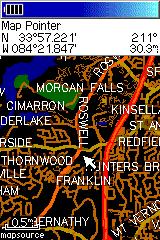
SCREEN RESOLUTION COMPARISONS:
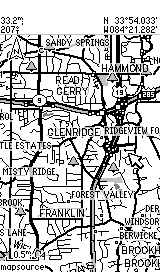 ......
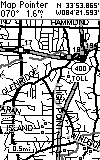
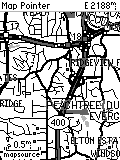 ......
G-60C Screen
GPS-V screen
eMap Screen
G-III+ Screen
In actuality, all four screens are just about the same physical
size.
Note: Above pictures are NOT to scale but show the different screen resolutions and presentation methods of the three models. The pixel count of the G-60C screen is (160 x 240 pixels) while the GPS-V is 160x256 and the eMap is 120x160 and that is reflected in the above pictures. The actual size of the G-60C screen is 1.5 x 2.2 inches and the GPS-V screen is approximately 1.5"x 2.2" which is same as the G-III+ shown on the right with its 100x160 pixel display. ALL of the screens are about the same physical size, but our pictures from different times using different screen dump programs fail to show this. Resolution suffers when we tried to make them all the same size as we no longer have the original images to work with.
FEATURES of the G-60C
We are going to try something new in explaining the features of the
G-60C. The number of option screens is quite large and the some features
are somewhat obscure and difficult to find. Therefore, we are
going to show screen photos of most of the G-60C's operational screens
and this will (hopefully) give a feature overview without too many words.
For this screen detail and overview,
click HERE.
The "highway display" useful for marine applications is substituted
by the above pointer which can be changed from a Bearing pointer to a Course
pointer. "Bearing" is the direct direction to the next routepoint
from present position.
The Course pointer calculates a fixed line from present position
or a routepoint to the next routepoint. The "To Course" command directs
one immediately back to the course line. NOTE that the Bearing pointer
is not the direction of the course line which remains fixed. Also
note the TO/FROM flag which is present in an aircraft HSI.
HOW DOES THE G-60C DIFFER FROM THE GPS-V? (Not
an exhaustive listing)
1) Daylight viewing color screen with lower current backlighting
for night viewing.
2) Fixed Helix Antenna
3) There is a Trip Computer Page.
4) Lower battery drain gives about 27 hours life on just 2 alkaline
AA batteries.
5) The G-60C has 8 selectable audio BEEP for alarms,
messages, and routing alerts.
6) The G-60C has a user programmable message for the initial Welcome
Screen.
7) The G-60C has an alkaline and NiMH battery selection so "battery
time to go" is more accurate.
8) The G-60C has both a USB and a Serial data cable connector.
Not all functions are available on both cables.
9) The G-60C has waypoint averaging and AREA CALCULATION.
10) The G-60C is lighter than the GPS-V and weighs only
7.6 oz. (215 g) with Alkaline batteries
11) The G-60C has the same operating temperature
range of 5ºF to 158ºF
(-15ºC to 70ºC)
12) The G-60C has automatic daylight savings time and automatic
time zone selection for the world. (cross check on this.)
13) The G-60C has only TWO AA batteries, yet gets much better battery
life than the GPS-V.
14) The G-60C has spring fingers on BOTH ends of each battery to
reduce or eliminate battery disconnect with vibration/shock.
15) The G-60C has unique features for GeoCache users.
16) The G-60C has a quick disconnect belt hook assembly.
17) The G-60C has 50
reversible routes, 10,000 track points with TracBack and 1000 waypoints
with many new graphical icons.
18) The G-60C has up to
56 megabytes of user map memory for detailed road, topo or other maps.
19) The G-60C has six electronic games included for kids and adults
alike.
20) The G-60C has no memory backup battery to fail.
The G-60C is a superior product overall. It provides a complete Car Navigator feature and Hiking GPS features as well as a useful set of Marine navigation features. While it is not as inexpensive as the GPS-5 and some other competitors, we think the color screen is about the best we have seen for out-in-the-sunshine use. . Other solutions such as the SP2610, SP-III, and various handheld palm computer products (Magellan Companion and Raco Destinator for example) offer larger (and optionally color) screens but the overall feature mix in the G-60C is hard to beat for users looking for a "full featured and general purpose" handheld GPS receiver. The G-60C is a general purpose unit equally at home hiking or on the highway and useful in casual marine applications. The "ON ROAD" option provides good highway and road guidance with specialized screens. The "OFF ROAD" mode provides the standard Garmin circular compass display that we like for hiking and marine use and other G-60C features make the unit quite suitable for hiking activities as well as on the highway use.
We found the battery life excellent and the longest we have seen with a color screen and especially with just two AA alkaline batteries. We liked the higher speed CPU which results in much faster screen redraws and route recalculations as compared with the GPS-V. We found the G-60C equally robust as compared with the GPS-V and it is rated waterproof to IPX-7. The G-60C antenna is sturdy and the overall construction appears robust and this unit should be as waterproof as any other Garmin unit.
The GPS-60C does NOT have a rotatable screen like the GPS-V had but we like the vertical screen in the car and when we are hiking better anyway.
The GPS-60CS is essentially the same instrument as the G-60C but with a barometer and electronic compass added. We have not tested this configuration.
WHAT DO WE NOT LIKE ABOUT THE G-60C?
There is not a lot to complain about with the G-60C. It packs
a lot of functionality in a small package. But:
1) We wish the backlight setting did not go to zero automatically
when power is turned off.
2) We wish the G-60C had a map cartridge capability.
3) For Car Navigation guidance, the spoken cues of the SP-2610/2650
are missed. (How quickly we are spoiled!)
4) We wish the various "page names" stayed on each of the many pages
until the space was otherwise needed. The unit has so many different
pages we sometimes got confused at first as to what setup pages we were
looking at.
Check latest Discount prices for the Garmin GPS-60C and 60CS HERE.
For questions about the G-60C hardware or mapping software, eMail JOE or JACK